Moving customer records and minutes
Bring your customer records. Check every opening balance.
Prepare a CSV of customer details and existing minutes, review each row, then check the imported records before reception starts using them.
Know what comes across
Customer details. Opening minutes.
SunbedHQ’s owner-only CSV import adds eligible new customer records at your salon and their opening minute balances. You can carry over an original expiry date. Possible duplicates are skipped, not merged into existing records.
Arrange the source-system export and field preparation separately. Historic bookings and payments, future bookings, documents and consents, customer logins, hardware setup and assisted onboarding are outside this import. Imported customers still have first-visit checks pending.
Before handling customer records, review the data-processing schedule and decide who will prepare and check the file.
01 / Prepare the file
Use the exact column order.
Open Customers → Import customers as the owner and download the current CSV template. Keep these six headers in order; add the optional expiry column only at the end.
first_name,last_name,date_of_birth,email,phone,opening_minutes,opening_expiry_date
Jordan,Reed,1988-09-03,[email protected],07700900202,30,2027-01-31first_name/last_name- Both values are required. Each name must contain 1–200 characters after trimming.
date_of_birth- May be blank. If supplied, use a valid
YYYY-MM-DDdate; the customer must be 18 or older. email/phone- May be blank. A supplied email must be valid and at most 320 characters. A supplied phone value must contain 1–100 characters after trimming. Keep phone values as text so spreadsheet software preserves leading zeroes.
opening_minutes- May be blank or zero for no opening balance. Otherwise use a non-negative whole number, at most 2,147,483,647, with no sign, decimal point or thousands separator.
opening_expiry_dateOptional column- Use
YYYY-MM-DDonly with positive opening minutes. The balance remains valid through the end of that day in Europe/London. Today’s date is accepted while that day has not ended; past dates are rejected. Blank means no expiry.
Use comma-separated CSV with exactly six or seven fields per row to match the header. Quote fields containing commas or line breaks, and double any quote inside a quoted field. Extra columns, wrong field counts and malformed quotes are rejected. Files are limited to 10,000 customer rows.
02 / Preview and review
Resolve errors. Check duplicates.
Upload or paste the CSV and select Preview import. Preview does not add customers. Each row shows its opening minutes, expiry date, status and any messages.
- ok
- Ready to import as a new customer.
- error
- Fix the row and preview again. Any error prevents the whole file from being committed.
- duplicate
- Skipped on import. Review against existing records and other rows; the importer does not merge or update them.
Possible duplicates include matching emails regardless of case, matching phone digits, or the same birth date with a similar name. Repeated identical rows within the file and previously imported rows are also checked. Editing the CSV clears the preview, so review the new result before importing.
Follow an import
Three rows. Two new customers.
Casey’s opening balance is 45 minutes with no expiry. Jordan’s is 30 minutes, expiring on 31 January 2027. Taylor matches an existing customer and is skipped.
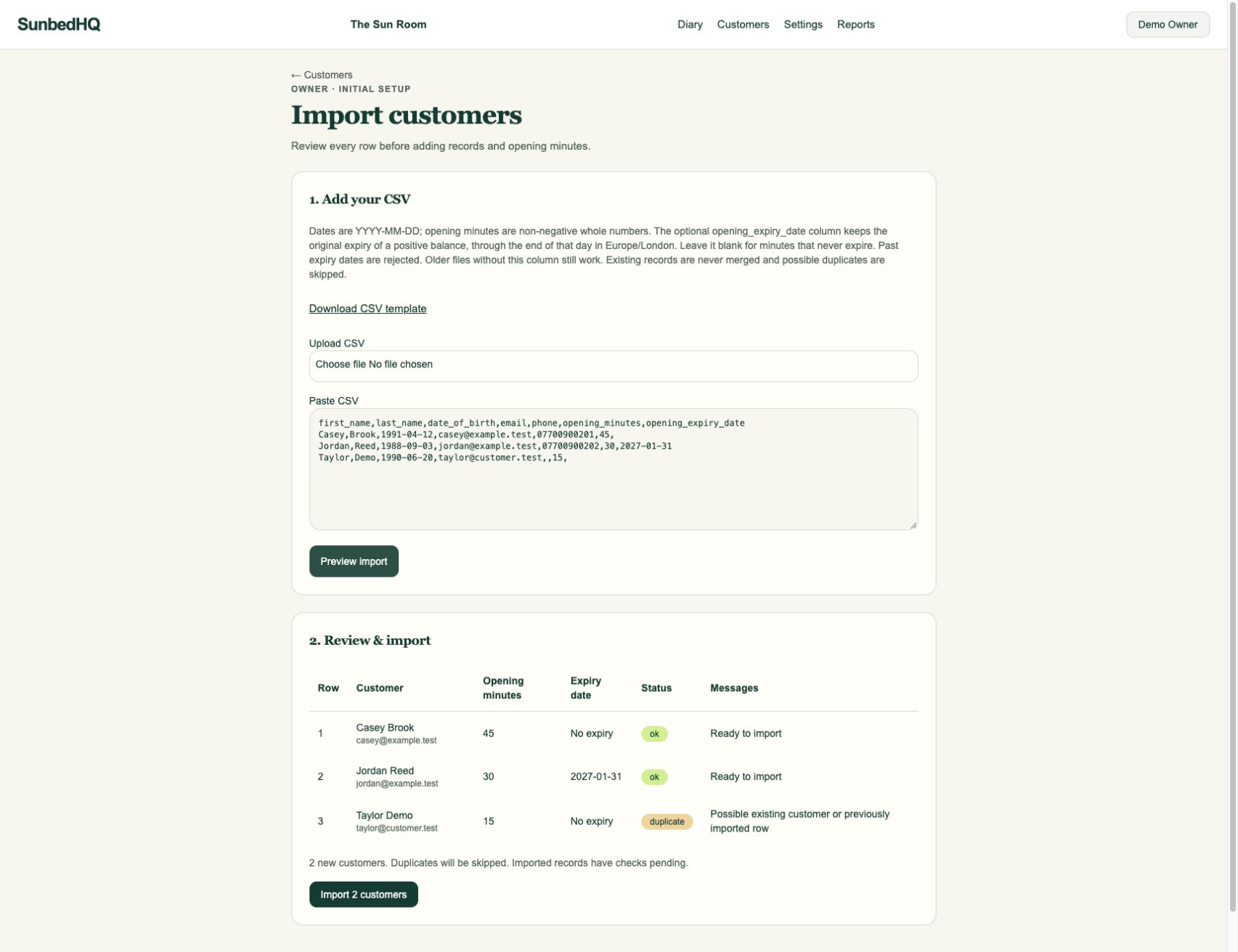
After confirming, the customer list went from five to seven records. Casey had 45 available minutes and Jordan had 30: 75 new opening minutes in total. Taylor’s balance stayed at zero.
An earlier preview included a row with an expiry of 1 January 2020. It showed an error and blocked the import until that row was removed. Previewing the completed file again marked all three rows as duplicates, with zero new customers ready to import.
03 / Import and reconcile
Check the records, not just the count.
Confirm the import.
When all errors are fixed, check the new-customer count and select the import button. SunbedHQ checks the rows again on commit and reports how many customers were inserted. Duplicates remain skipped.
Match each opening balance.
Open the imported customer profiles. Match the available minutes and original expiry dates to your final source file, then check the opening import entries in minute history. Reconcile the total across imported rows, keeping skipped records separate.
Account for everything else.
Review upcoming bookings, any payments still due and the records retained in your previous system. Arrange customer login invitations and complete the required first-visit checks separately.
Agree the handover
One final balance. A clear starting point.
Start with the records you have
Plan the switch in a demo.
Discuss your export, opening balances and the work needed before reception changes over.