At reception
A clear diary
for every bed.
See online bookings and walk-ins together. Record cash taken at reception, and block time for cleaning or maintenance.
The reception diary
The visit, and the time around it.
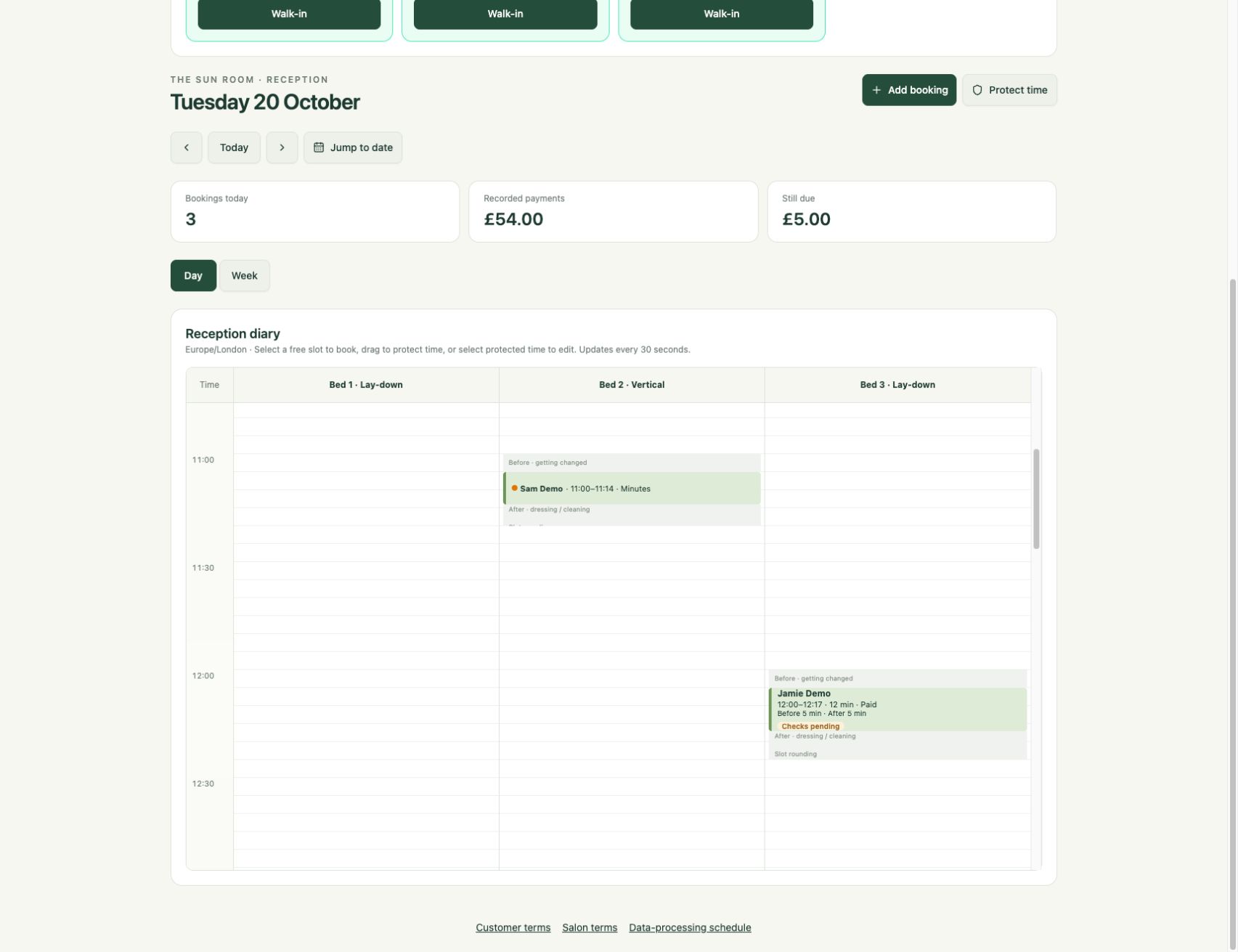
Look across the day by bed. See session entries, payment labels and the room time set aside before and after each visit.
A walk-in arrives
The diary stays together.
One reception routine, from finding a space to leaving the room ready for the next customer.
Find the space.
Check the day diary across your beds, or use the bed board to see what is ready now. Online and staff bookings use the same availability checks, with staff able to book time reserved for reception.
Add the visit.
Choose the customer, bed and session length. If they have enough eligible minutes at your salon, use that balance. Otherwise, keep the booking showing payment due until payment is recorded.
Record what was taken.
When the customer pays cash at reception, record it against the visit. You can also record a payment taken on an external card terminal. A payment record documents what was taken; it does not operate the terminal.
Leave room to reset.
The session has its configured room time around it. For additional cleaning or maintenance, add a closed block. The block protects capacity without creating another customer booking or payment.
Choose your view
Today across your beds. The week for one bed.
Use the day view to see the reception diary across beds. Switch to the week view and choose a bed to look further ahead, without mixing every room into the same column.
The bed board brings the current visit into focus, from changing time through the session and reset time. It records the visit in SunbedHQ; staff still start the physical sunbed on its controller.
When a customer books from their phone, the booking joins the reception diary. Explore the customer booking journey →
Time that belongs in the diary
Make room between visits.
Availability includes the salon’s time before and after a session, plus the bed’s cool-down time. These minutes reserve space around the visit; they are separate from the customer’s tanning minutes. Beds marked inactive or out of service are excluded from new availability.
- Closed time
- Removes capacity for both online and staff bookings. Use it when a bed needs cleaning or maintenance.
- Staff-only time
- Prevents online bookings while leaving reception able to book the space, for example when keeping capacity for walk-ins.
- Customer bookings
- Belong to a customer, with a session length and funding or payment status. Protected time is a capacity decision, not a paid visit.
At the desk
Useful answers.
Can two bookings take the same bed at the same time?
SunbedHQ checks bed availability when a booking is made, including existing bookings, protected time and session buffers. If the time has just been taken, choose another available time.
Can we amend a booking?
Staff can reschedule bookings subject to availability and the booking’s status. Customers can change the time of an eligible confirmed booking before its change deadline, keeping the same bed type and session length.
Can we use a customer’s existing minutes?
Yes. Available minutes belong to that customer at your salon. Minutes used for a booking are reserved first and deducted when the session starts. Check the eligible balance before choosing minute payment.
Does the bed board switch on the sunbed?
No. It records the visit and session progress in SunbedHQ. Staff still operate the physical bed on its controller. Discuss your existing equipment during the demo.
Bring your reception routine
See how your day fits together.
Walk through bookings, minutes and protected time for your salon.