Tanning minutes and course management
Every minute
accounted for.
Follow a customer’s prepaid minutes from purchase to booking to session, with expiry dates and a history of changes.
One salon. One customer balance.
Know what is available to book.
A course in SunbedHQ is a package of tanning minutes. Reception can record a package sale paid in cash or on your external card terminal. Those minutes belong to that customer at your salon, even if they use the same login elsewhere.
- Available
- Minutes free to reserve. The session must also fall before the minutes’ expiry.
- Reserved
- Minutes set aside for a booking. They cannot fund another booking, but have not yet been used.
- Used
- Minutes consumed when staff start a session. Check-in alone does not consume them. Late cancellations and no-shows can also forfeit minutes; the history shows the movement.
Follow a course
From 60 minutes to the next visit.
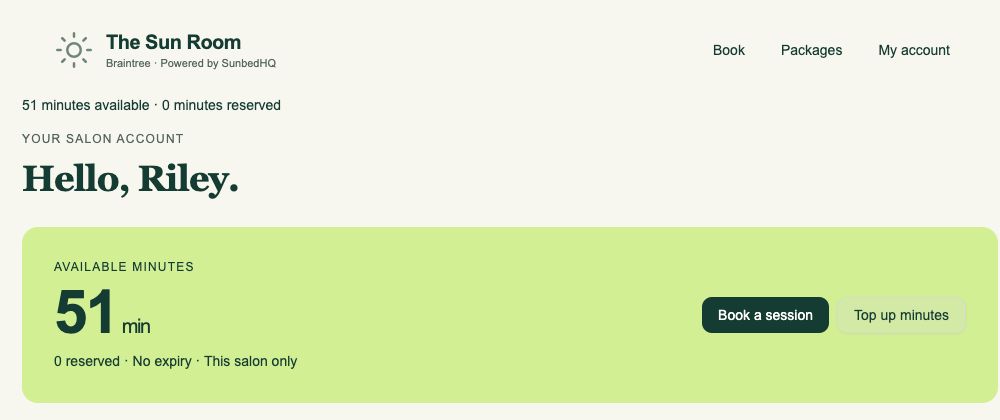
Riley’s course starts with 60 minutes and no expiry. A nine-minute booking reserves nine. The salon cancels that booking, releasing the reservation, then books another nine-minute session. Starting that session uses nine minutes.
| What happens | Available | Reserved | Used |
|---|---|---|---|
| Reception records the 60-minute sale | 60 | 0 | 0 |
| Book a nine-minute session | 51 | 9 | 0 |
| The salon cancels the booking | 60 | 0 | 0 |
| Book another nine-minute session | 51 | 9 | 0 |
| Start that session | 51 | 0 | 9 |
After the session starts: 51 available + 0 reserved + 9 used = 60 minutes. The purchase, reservations, release and consumption remain in the customer’s minute history.
Read the history, newest first.
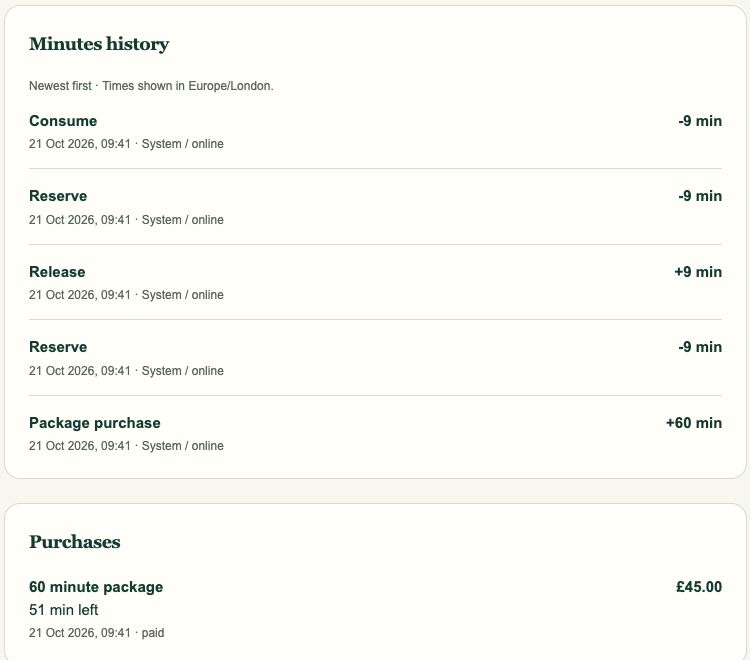
The staff record shows the same course from purchase through reserve, release, reserve and consume. The purchase card has 51 minutes left.
Reserve and consume are separate stages of the same nine-minute booking. Starting the session clears the reservation and records its use; it does not take another nine from the available balance.
The session date matters
An expiry follows the purchase.
Packages can have a validity in calendar months or no expiry. A purchase keeps its expiry date when the package settings change. Dated minutes run to the end of their expiry day in Europe/London.
Booking before expiry is not enough: the session must start before expiry too. SunbedHQ reserves eligible minutes with the soonest expiry first, followed by minutes with no expiry.
Cancellation releases a reservation; it does not extend the original expiry. Unused minutes that have expired are no longer available to book. See the current customer terms and your salon’s purchase conditions for cancellation and refund details.
Changes with a reason
Keep the explanation with the record.
Staff can extend a paid course’s existing expiry to a later date while it is still unexpired. A reason is required, and the previous and new dates appear in exception history. A course with no expiry, or one that has already expired, cannot use that extension action.
Owners can make positive or negative minute adjustments with a reason. Each correction adds a new minute movement, preserving the earlier entries. Reception can read the balance alongside its history rather than relying on an overwritten total.
A timely cancellation releases reserved minutes. Once a session has started, those minutes have been consumed: cancelling a reservation is not a way to return them. Late cancellations and no-shows follow the salon’s conditions and can forfeit the reserved minutes.
Bring a course to the demo
Follow the balance. Read the history.
Walk through a sale, booking, cancellation and session with your salon’s rules.