On their phone
From their phone
to your reception diary.
Customers choose a bed type and available time, then keep bookings and salon minutes together in their account.
The first two steps
Their session. Their time.
The booking journey runs in the browser. Customers choose an offered bed type and session length, then pick from available dates and times.
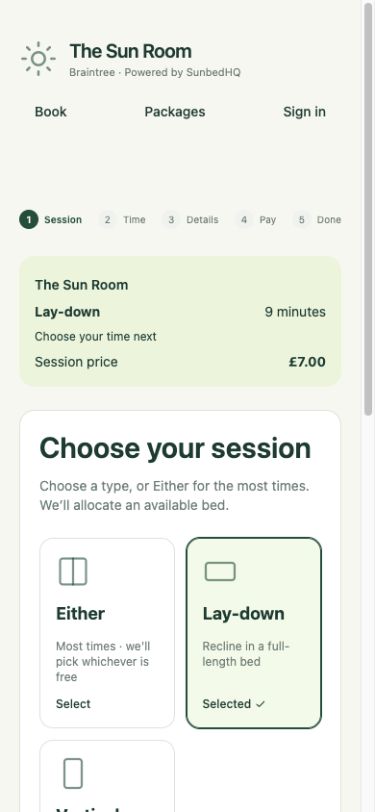
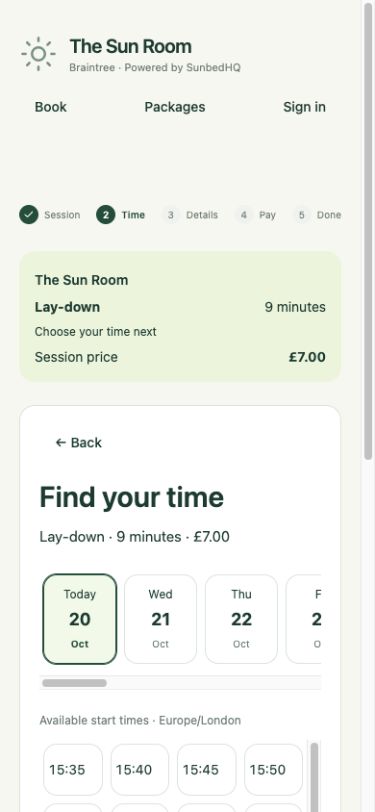
From selection to booking
A visit, step by step.
Choosing a time is the start. Sign-in, booking conditions and confirmation complete the journey.
Sign in and review.
Customers sign in or create an account, complete required first-visit details and review the salon’s booking conditions. Reception still completes the salon’s required age and first-visit checks.
Use minutes or continue to payment.
Eligible salon minutes can cover the session. Online card payments are designed to work through the salon’s connected Stripe account, subject to its connection and payment readiness.
Check the confirmation.
A confirmed booking appears in the customer account and reception diary. A slot held during card checkout is still awaiting payment confirmation. Returning from checkout alone does not confirm the booking.
Their minutes. Your salon.
A balance that stays with you.
Customers can use the same SunbedHQ identity at participating salons, but each salon keeps its own customer record and minute balance. They may need to sign in separately at another salon. Minutes bought at one salon are not a shared balance across salons.
Enough eligible minutes must be available for the session. The booking reserves those minutes, and the session start deducts them. A session cannot be part-paid with minutes and part-paid by card.
At reception, staff can see the booking and its payment or minute status. See how the bed diary fits together →
When plans change
Clear conditions. A place to manage visits.
The booking review shows the salon’s booking conditions and cancellation deadline before the customer commits. From their account, customers can cancel or move an eligible confirmed booking.
Online rescheduling keeps the same bed type and duration. It must meet the change deadline and current availability. For other changes, the customer contacts the salon.
Before their first visit
Useful answers.
Do customers need to download an app?
No. The booking journey runs in their browser, with session and time selection followed by sign-in and review.
When is the booking confirmed?
A minute-funded booking is confirmed when the booking is created successfully. For a card booking, the slot is held while payment is completed and SunbedHQ checks the resulting payment status. Customers should check for confirmation in their account.
Are cash records the same as online card payments?
No. Reception can record cash or an external payment against a visit. Connected Stripe processing is a separate online payment route and depends on the salon’s connection and readiness.
Where do customers see the conditions?
The booking review presents the salon’s adopted booking conditions and cancellation deadline. Customer account terms are also available before using the service.
From the customer’s side
Walk through the whole journey.
See how online booking connects to the way your reception works.